
Your energy portfolio. Under control.
Govern projects, milestones, dependencies, baselines and decisions in one place.
See what changed across the portfolio — and give your enterprise AI read-only access to the same authorized context. A defined scope you can start with, not a transformation you have to buy first.
Projects · Milestones · Baselines · Decisions · Reporting · MCP included
Last updated
Your forecast changes. Your organization should remember why.
Projects tracked in scattered files
Every country, every team, its own spreadsheet. There is no current common view of the pipeline.
Old expectations disappear
The quarterly and committee baselines become hard to reconstruct. What did we expect in January? Somebody has the file.
Reporting needs rebuilding
Management asks which assets moved, and the team gathers spreadsheets and emails again — for every cycle.
The problem isn't that milestones move. It's losing the context of the change.
What did we expect? What changed? Where do we act next?
Every reporting cycle Navorda Platform locks a version — Budget, Forecast, a monthly snapshot or a custom baseline. Locked versions never change, so today's dates can always be read against what was committed, milestone by milestone, project by project.
When the RtB forecast for next quarter moves from 820 MW to 650 MW, Navorda Platform shows the committed MW against the forecast MW for that milestone and period, and the projects behind the difference: which milestone moved, from when to when, who owns it, and the decision recorded about it where there is one. The reason is whatever the team wrote down — Navorda keeps the context, it does not invent it.
Illustrative example with fictional data. The approved January baseline forecast 820 MW reaching RtB next quarter; the current forecast is 650 MW, a net change of minus 170 MW. Two projects explain the difference: Alcázar Solar, 120 MW, RtB moved from 15 March to 28 June, 105 days late, owner M. Ortega, decision D-041 keeps it in the Q3 portfolio; Vento Norte, 50 MW, grid approval before RtB moved from 2 February to 20 May, 107 days late, owner J. Haas, no decision recorded yet.
When the substation slips, every project behind it knows.
Projects rarely stand alone. Two plants share a substation; a line waits on a grid connection; a BESS is co-located with the solar park beside it. Navorda Platform records these structural relationships — project to project, plant to line to substation — separately from the milestone-to-milestone dependencies inside each project.
An upstream slip therefore shows its downstream impact without anyone reconstructing the chain in a meeting. The chain is a property of the model, not of someone's memory.
Illustrative dependency chain. Solar Alpha, 120 megawatt-peak, and BESS Beta, a co-located storage project, both evacuate through the shared substation Norte, which depends on a 220 kilovolt grid connection expected in September 2027. When the grid connection slips, the substation, and with it both projects, inherit the delay.
Illustrative example.
Value at both ends of the operating model.
The same governed record is maintained in execution and read in management. Each level gets its own value from it — nobody enters data only so that somebody else can report.
- Project Manager
maintains project reality efficiently — and uses it to run the project.
What's in it for you - Head of Development / Construction
governs commitments — who owns what, and by when.
What's in it for you - COO / C-level
manages from that reality, not from reconstructed reports.
What's in it for you - CFO / Finance
connects that reality to financial forecasts, capital requirements and investment decisions.
What's in it for you
And across all of them
CTO / Technologyprovides the operating foundation underneath all four — so systems and AI consume project reality instead of reconstructing it.
What's in it for youReality travels upstream. Decisions and accountability travel downstream.
Eight capability groups. One project model.
Projects & attributes
Your pipeline in one governed project registry, with capacities, country, technology, responsibilities, the configurable attributes your organization actually tracks, and KPIs: metrics captured as direct input or calculated from Platform data, such as the latest permit date.
Milestones, templates & dependencies
Model permits, land readiness, RtB, NtP, COD and country-specific milestones. Each milestone carries its date — past or future — a comment, and who created or changed it and when. Reuse templates and link the milestones that depend on each other.
Automatic stage
Keep project progression aligned with milestone completion according to your configured rules — the stage follows the milestones, nobody sets it by hand.
Baselines & deviations
Freeze reference forecasts, compare versions and surface the projects and commitments whose dates changed — including the MW committed to reach a milestone in the approved baseline against the MW now forecast, period by period.
Project ownership & infrastructure links
Associate projects with their SPVs and connect related assets, including shared substations and infrastructure projects. Shareholder trees are optional, in Navorda Transactions.
Embedded reporting
Work with the portfolio from native Navorda views, dashboards, comparisons and reports, without a separate BI implementation. The Power BI semantic twin is optional, in Navorda Connect.
Decisions
Record management decisions in the context of the relevant project, milestones and evidence — who decided what, on whose behalf, and what follows.
Enterprise AI through MCP
Connect compatible AI to the governed Platform context, read-only and under your user permissions. Navorda AI agents and the enterprise API are optional.
Ask your AI about the same portfolio your team governs.
The Navorda MCP Connector is included in Navorda Platform. Your organization's own AI — Claude, ChatGPT or any MCP-compatible client — reads the governed Platform context live, read-only, under each user's permissions, instead of reasoning from exports pasted into a chat.
- MCP Connector — included with Navorda Platform: your enterprise AI reads the permitted context.
- Navorda AI — optional: Navorda's own embedded agents, running inside Navorda.
- Navorda Connect — optional: the REST API, the Power BI semantic twin and enterprise integrations, for systems rather than AI.
Illustrative exchange between a user and their enterprise AI reading Navorda through the MCP Connector. User: How many MW do we now expect to reach RtB next quarter? AI: The current forecast is 650 MW. User: What was the approved baseline? AI: 820 MW in the January baseline; the difference is −170 MW. User: Which projects explain the difference? AI: Two projects with changed RtB dates, based on the authorized milestone and baseline records: Alcázar Solar (120 MW, +105 days) and Vento Norte (50 MW, +107 days). Illustrative exchange. Answers depend on data quality, user permissions and the MCP tools currently available. The connector does not invent missing reasons or grant access to unlicensed modules.
What teams can now answer
- Which projects are drifting from the committed baseline, and when did the drift start?
- Which assets are at risk of missing RtB this quarter — and which permit or land milestone is the reason?
- How many MW reach RtB next quarter against the approved baseline, and which projects explain the difference?
- Which milestones (NtP, COD, PAC) have changed since the last board cycle?
- Which SPV owns this project?
- If the shared substation slips a quarter, which projects inherit the delay?
- What did the Investment Committee decide about this project — and did it happen?
Start with your existing project list.
Bring representative projects and attributes
Create projects or import the list you already keep. Set technology, stage, capacity, location, portfolio structure and responsibilities.
Configure milestone templates, stage logic and a baseline
Define the milestones that match how your organization develops — permit and land-readiness milestones included — link the ones that depend on each other, set the stage rules, and lock a first baseline.
Compare changes, review reports, capture decisions, connect AI
Read deviations against the baseline, work from the embedded views, record the decisions taken, and connect your enterprise AI through the included MCP Connector when you are ready.
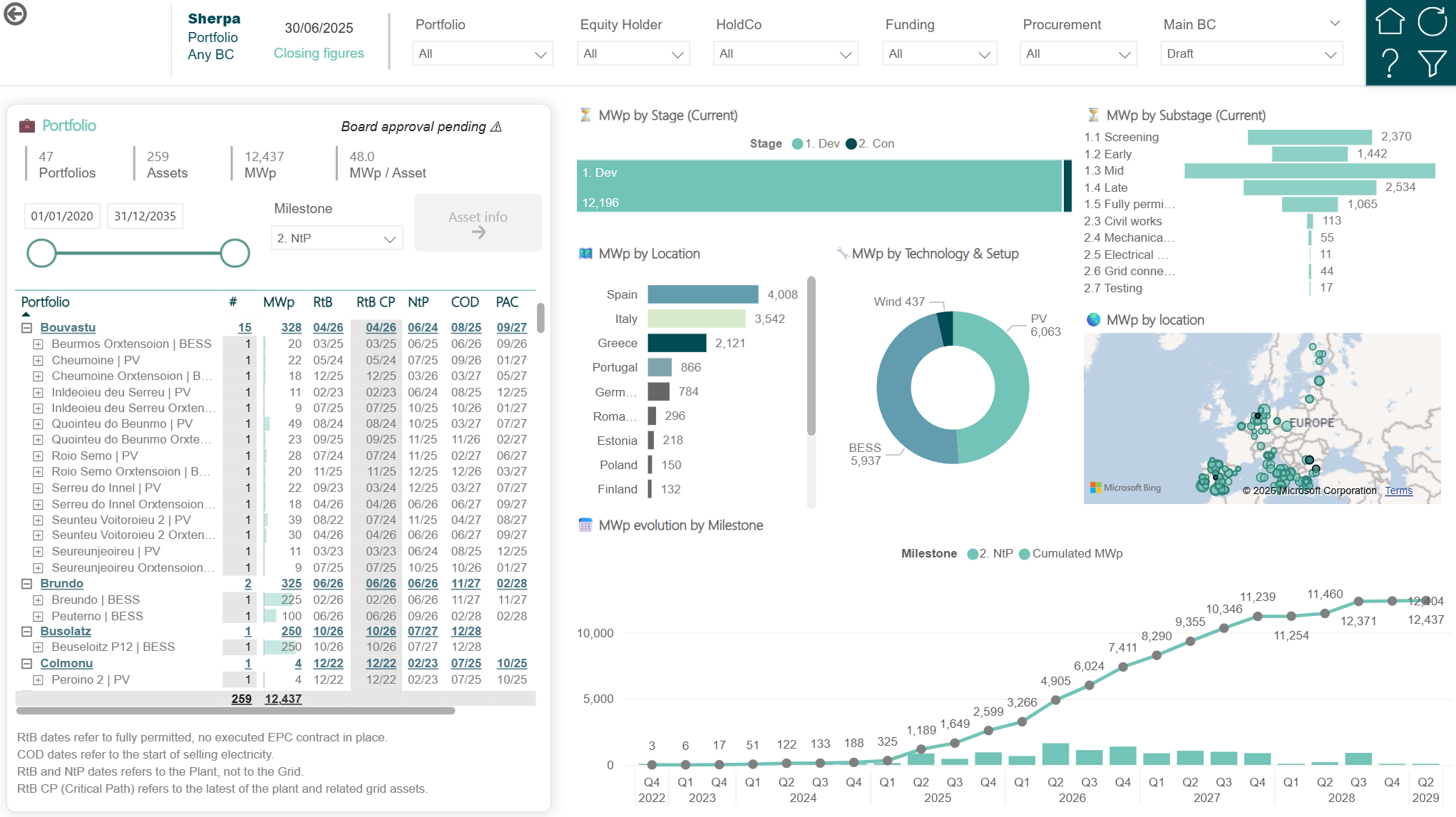
The portfolio view: every project, every stage, the KPIs your board asks about — read from the same record the teams work in.
Add specialist depth only when you need it.
You do not need any add-on, integration or BI project to start. Bring your project list, set your milestones, lock a baseline — and add depth when a team needs it. Every add-on extends the same record; nothing is re-entered.
One record. Every question about it.
The milestone that gates RtB, the milestones that depend on it, the baseline it is measured against and the decision taken about it are not four lists. They are one project record — and every optional add-on, agent and connector reads that same record rather than copying it.
Navorda Platform governs the project. Add-ons deepen specialist workflows.
Navorda Platform includes: Project, then Milestone & dependency, then Baseline, then Decision, then Embedded report, then MCP to your AI. Optional add-ons extend it: Risks, then Parcels, then Postings, then Transactions, then Agreements, then Models, then Enterprise systems. A permit milestone slips → the milestones that depend on it move → the baseline shows the deviation → the decision taken about it is recorded on the project → the portfolio view and your enterprise AI read the same change.
A complete foundation. Without buying everything on day one.
Navorda Platform includes projects with configurable attributes and KPIs; milestones for development, permitting and land readiness with templates and dependencies; automatic stage from milestone logic; baselines and deviation control, including committed versus forecast MW per milestone and period; project-to-SPV ownership; relationships between projects and shared infrastructure; embedded reporting; the Navorda Decisions register; and the included read-only MCP Connector for compatible enterprise AI.
| Capability | Navorda Platform | Optional add-on |
|---|---|---|
| Projects, configurable attributes and KPIs (manual metrics and KPIs calculated from Platform data) | Included | — |
| Milestones, including permit and land-readiness milestones | Included | — |
| Milestone templates and dependencies | Included | — |
| Automatic project stage from milestone logic | Included | — |
| Baselines and deviation control | Included | — |
| Committed versus forecast MW per milestone and period | Included | — |
| Project-to-SPV ownership association | Included | — |
| Project-to-project and shared-infrastructure relationships | Included | — |
| In-application portfolio reporting | Included | — |
| Decisions register | Included | — |
| Read-only MCP Connector for enterprise AI | Included | — |
| Quantified risk management | — | Navorda Risks |
| Geospatial land, parcels and contracts | — | Navorda Land |
| Project financial management | — | Navorda Finance |
| Transaction and SPA lifecycle | — | Navorda Transactions |
| Shareholder trees and ownership percentages | — | Navorda Transactions |
| Offtake and PPA governance | — | Navorda Offtake |
| External Excel and model governance | — | External Models Governance |
| Enterprise integrations with ERP, CRM and treasury | — | Enterprise Integrations |
| Power BI Semantic Model Twin | — | Navorda Connect |
| REST API for enterprise applications | — | Navorda Connect |
| Embedded AI agents | — | Navorda AI |
Add-ons extend the same underlying project model.
Every optional capability reads and extends the same project record. Nothing is re-entered or copied into a second system when an add-on is activated.
Specialist depth is optional: Navorda Risks, Navorda Land, Navorda Finance, Navorda Transactions (SPAs and shareholder structures), Navorda Offtake, External Models Governance, Enterprise Integrations, Navorda Connect (Power BI Semantic Model Twin and REST API) and Navorda AI extend the same project model when the organization needs them.
Frequently asked questions
Your portfolio, governed from the first milestone.
Start with the project information you already maintain. Add workflows, models and integrations as your organization needs them.