
Your enterprise AI, connected to your portfolio context.
Your AI uses Navorda's context.
AI can reason only from the context it can access. The Navorda MCP Connector lets your organization's AI work with the governed data, relationships, history and operational meaning already maintained in Navorda — without rebuilding that context in another system. It is powered by Navorda's native MCP (Model Context Protocol) server, built on the open standard adopted by Claude, ChatGPT and the leading AI tools. The AI can never write, and landowner contact data never leaves Navorda.
Included in Navorda Platform — no separate purchase, subject to per-organization enablement, per-user OAuth authorization and the tool scopes of the modules you license.
Last updated
Sound familiar?
Copy-paste analytics
Your team already asks ChatGPT and Claude to analyze portfolio data — by pasting exports into a chat window. The answer is stale the moment it's generated, and sensitive data just left your governance perimeter.
Integration projects that never ship
"Connect our data to AI" usually means a 6-month API project, a vector database, and a consultant. Meanwhile the questions leadership actually asks are simple: how many, how much, since when, compared to what.
AI access with no guardrails
Generic AI-to-database connectors get write access, see every column, and answer to nobody. Legal says no, and legal is right.
Your AI does not need another copy of the data. It needs access to the operating context.
A conventional API exposes records and endpoints. The Navorda MCP Connector exposes data, relationships, governed context and purpose-built analytical capabilities — the record Navorda Platform keeps, as your AI can use it.
Without Navorda, enterprise AI reasons from isolated documents, spreadsheets, exports and database tables. With the Navorda MCP Connector, included in Navorda Platform, the same AI reads development funnel, projects, milestones, governance decisions, tenant glossary, search and fetch — pinned to locked baselines, with the relationships between them — and land contracts, spas, risks, exposure, agent findings where the matching add-on is licensed.
Data alone is not enough.
For an AI model, a date is a string and a status is a word. Navorda adds what makes them mean something.
What the model receives as data
- RtB = 15 June
- NtP = 1 September
- Permit status = delayed
- Money at risk = €1.2m
What Navorda adds: the relationships
- which project the dates belong to
- what baseline they are being compared against
- which permit is blocking RtB
- which NtP depends on RtB
- which risk threatens the permit
- which SPV owns the project
- what changed and when
That is the strategic value of the connector.
Everything you need
Plain-language portfolio Q&A
"How many projects are in permitting?" "Which assets are past their RtB date?" "Compare this forecast against the September baseline." Your AI queries Navorda live and answers with your real numbers — no exports, no stale spreadsheets.
17 curated read-only tools
Purpose-built tools for the questions that matter: development funnel, project deep-dives, portfolio-wide milestone sweeps, governance decisions, land contracts, SPAs, the risk register, aggregated exposure, and agent findings. A Platform-only subscription uses the Platform subset; tools over add-on data activate with the matching add-on. Not a raw database dump — a curated analytical surface.
Speaks your organization's language
A glossary tool teaches the AI your tenant's vocabulary at runtime — your entity names, your development substages, your milestone catalog, your KPIs. If you call projects "Assets", so does the AI.
Version-aware answers
Every answer defaults to your official ruling data snapshot — the same one your reports use. Ask for a comparison and the AI reads any locked baseline side by side: "how did the timeline move vs. Budget?"
Works with the AI you already run
Claude (claude.ai, Desktop, Claude Code), ChatGPT connectors including deep research, Cursor — any client that speaks MCP over Streamable HTTP. Standards-based OAuth means clients connect themselves; there are no API keys to issue or rotate.
Navorda Analyst skill included
A free, installable skill for Claude and ChatGPT Projects that teaches the AI how to query Navorda well: aggregate first, respect your funnel ordering, interpret milestones correctly, and present exposure per currency. Your team gets expert-level answers from day one.
Read-only by architecture, not by policy
Most "AI + your data" pitches ask you to trust a checkbox. The Navorda MCP Connector, powered by Navorda's native MCP server, is engineered so the trust question doesn't come up.
No write path exists
Write tools were never built, the only permission scope in existence is read-only, and a server-side lock rejects any mutation at the database layer. This is a product invariant enforced in six independent layers and pinned by automated tests — not a setting someone can flip.
Off by default, opt-in per organization
The connector is disabled until an admin of your organization enables it. Choose whether every user can connect or only a named allowlist — removal cuts access on the very next request.
Standard OAuth 2.1, no shared secrets
Each user authorizes with their own Navorda login and explicitly picks the organization on a consent screen. Access is pinned to that organization, tokens are short-lived and rotated, and there are no API keys to leak.
Landowner PII never leaves
Counterpart contact details — emails, phones, addresses, tax IDs — are structurally excluded from every MCP response, regardless of the user's role. The AI sees names and roles, never personal contact data.
Every call audited
Each tool call is logged with the user, the organization, the tool, and the connecting client. Admins see exactly who asked what, from where. Users manage and revoke their own connections from their profile — "Connected AI clients", one click.
Rate-limited by design
Per-connection throttling (30 requests/minute, 2,000/day) keeps AI traffic a well-behaved guest on your workspace, and role-based permissions still apply — the AI can only read what the connecting user can read.
Access follows membership: if a user leaves an organization, their existing AI connections to it are revoked automatically. External AI clients access only the data authorized through the MCP connection; their own enterprise data-handling terms apply to what they receive. The platform-wide posture — Frankfurt hosting, encryption, identity, auditability — is on the security page.
How it works
Enable it for your organization
An admin turns the connector on in Configuration → MCP Connector and decides who may connect: everyone, or a named list of users.
Connect your AI client
In Claude or ChatGPT, add a custom connector with your Navorda URL (https://app.navorda.com/api/mcp). Log in with your normal Navorda account — SSO included — and pick your organization on the consent screen. No API keys, no IT ticket.
Ask
"Give me a portfolio brief." "Which projects have critical findings?" "What moved against the Budget baseline?" Your AI queries live data, in your vocabulary, from your official snapshot — and it can never change a thing.
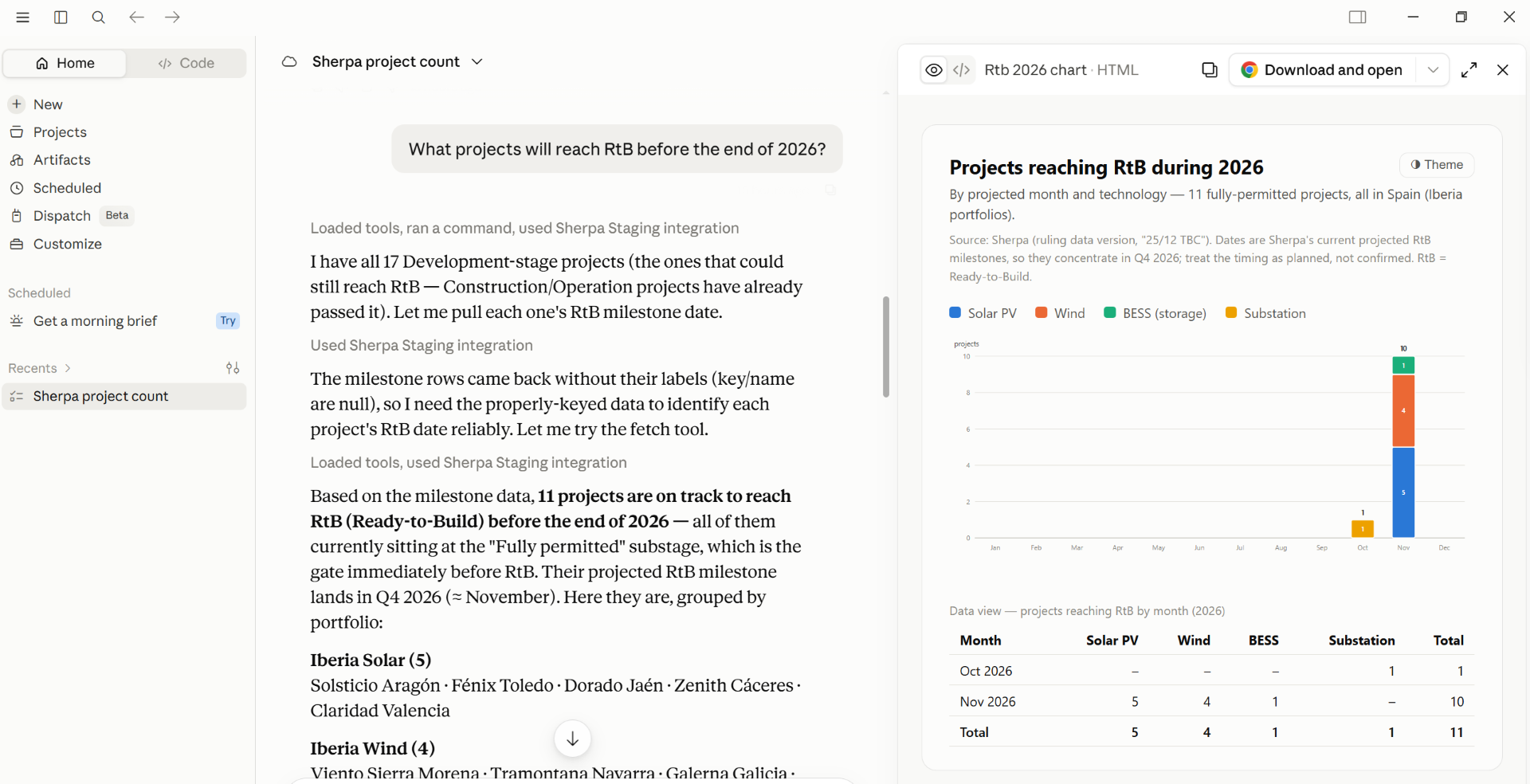
Claude answering "What projects will reach RtB before the end of 2026?" — milestone data queried live through the Navorda MCP Connector, charted and grouped by portfolio.
Real questions the connector is built to answer
No setup beyond connecting.
"How many projects are in each development substage?"
"Which projects are past their Ready-to-Build date?"
"What's our total money at risk, by currency, and where is it concentrated?"
"Deep-dive the Alcochete project: milestones, contracts, open risks."
"Compare the current forecast against the September baseline."
Same operational truth. Two ways to use AI.
Navorda AI: Navorda uses its context for you. The Navorda MCP Connector: your AI uses Navorda's context.
| Navorda AI Navorda uses its context for you. | Navorda MCP Connector Your AI uses Navorda's context. | |
|---|---|---|
| Intelligence lives | Inside Navorda | In your enterprise AI environment |
| Who operates the AI | Navorda | You |
| Context source | Navorda | Navorda |
| Typical use | Continuous monitoring and embedded insight | Ask your enterprise AI questions using Navorda context |
| Interface | The Navorda UI | ChatGPT, Claude or another MCP-compatible enterprise AI |
| Purpose | Navorda intelligence | Bring Navorda context to your intelligence |
| Product | Optional intelligence add-on | Included in Navorda Platform |
Frequently asked questions
Reads the governed record Navorda Platform keeps
Ready to let your AI read your governed project reality?
Models will evolve. Interfaces will change. The durable asset is your organization's context. Two minutes to connect. Read-only by architecture. Navorda never uses your portfolio data to train AI models — and every connection stays governed: per-user authorization, audit logging, structural PII exclusion.